Invite your team
Your team manages the knowledge; your customers never need an account. Invite colleagues to each knowledge base they should work on.
Before you start
- You're an owner or admin of the knowledge base.
- A free seat. Free includes 1 seat, Starter 3, Growth 10 and Scale 25. Members and pending invites both count.
Four steps
Open the Team page
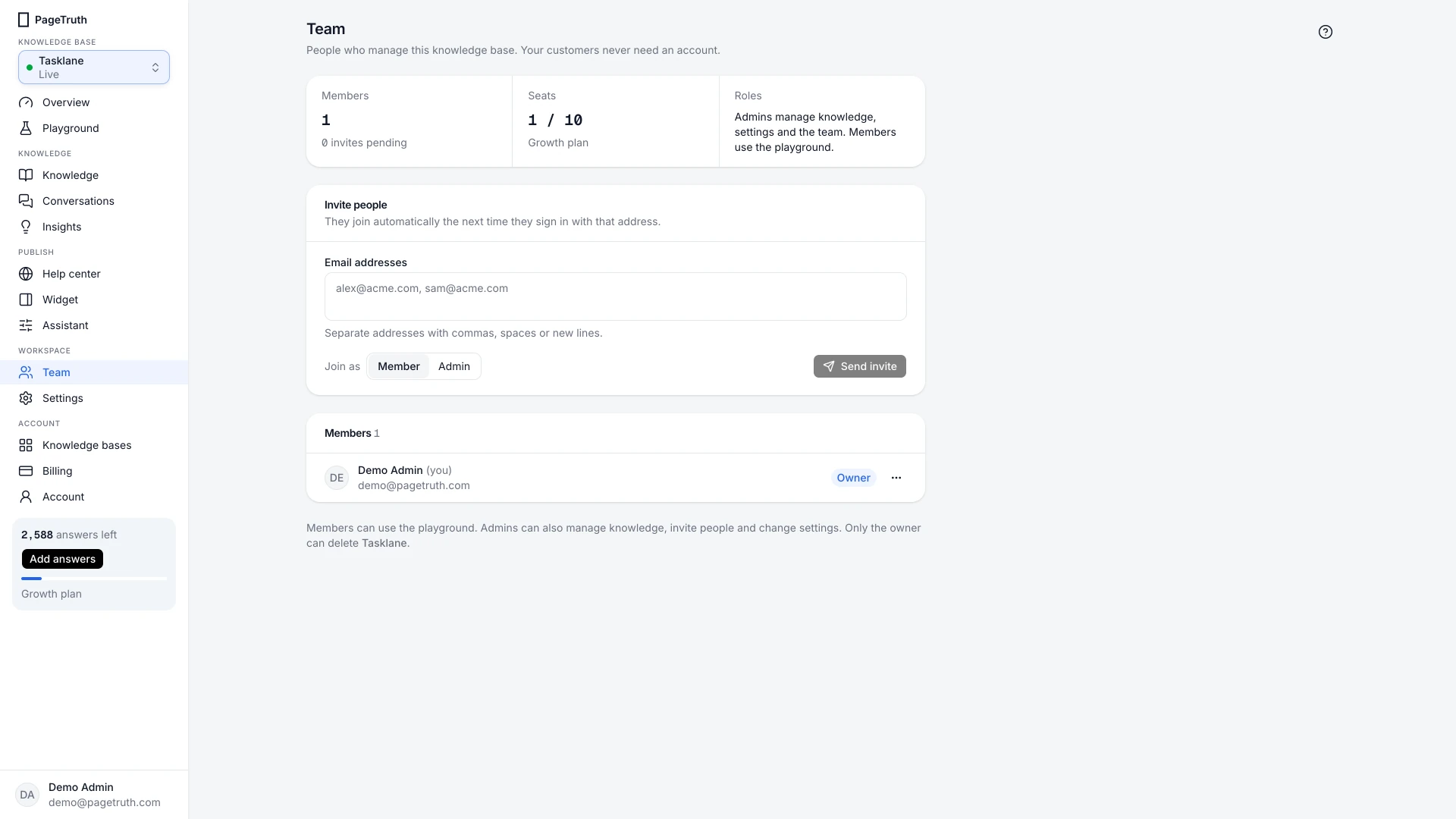
Choose Team in the sidebar.
Enter their email addresses
Under Invite people, type one or more Email addresses. Separate addresses with commas, spaces or new lines.
Choose their role
Under Join as, choose Member or Admin. Roles and permissions explains the difference.
Send the invite
Choose Send invite. Each person gets an email from hello@pagetruth.com, and joins automatically the next time they sign in with that address.
The invite shows under pending invites, and moves to the member list once they sign in.
If something's not right
They didn't get the email
Ask them to check spam, or simply to sign up or sign in at pagetruth.com with the invited address. The invite is waiting for that address either way.
It says every seat is in use
Remove someone who no longer needs access, revoke an old invite, or upgrade on Billing.